
Co-Founder & CTO, SnapMenuAI, Inc


Customers already use text messaging for quick everyday conversations. Restaurant ordering can now happen in much the same way.
Instead of downloading an app, browsing a restaurant website, or calling and waiting for someone to answer, a customer can simply text the restaurant.
An SMS ordering conversation can move from a menu question to a customized order, payment, and confirmation within one continuous interaction.
That makes SMS ordering for restaurants more than another communication tool. It becomes a direct ordering channel.
What is SMS ordering for restaurants?
SMS ordering for restaurants allows customers to ask questions, build an order, customize items, receive payment instructions, and get confirmation through text messages.
Traditional restaurant texting often sends promotional messages or links customers to another ordering page. Conversational SMS ordering goes further by allowing more of the actual ordering process to happen inside the text conversation.
A typical flow looks like:
Text → Ask → Choose → Customize → Order → Pay → Confirm
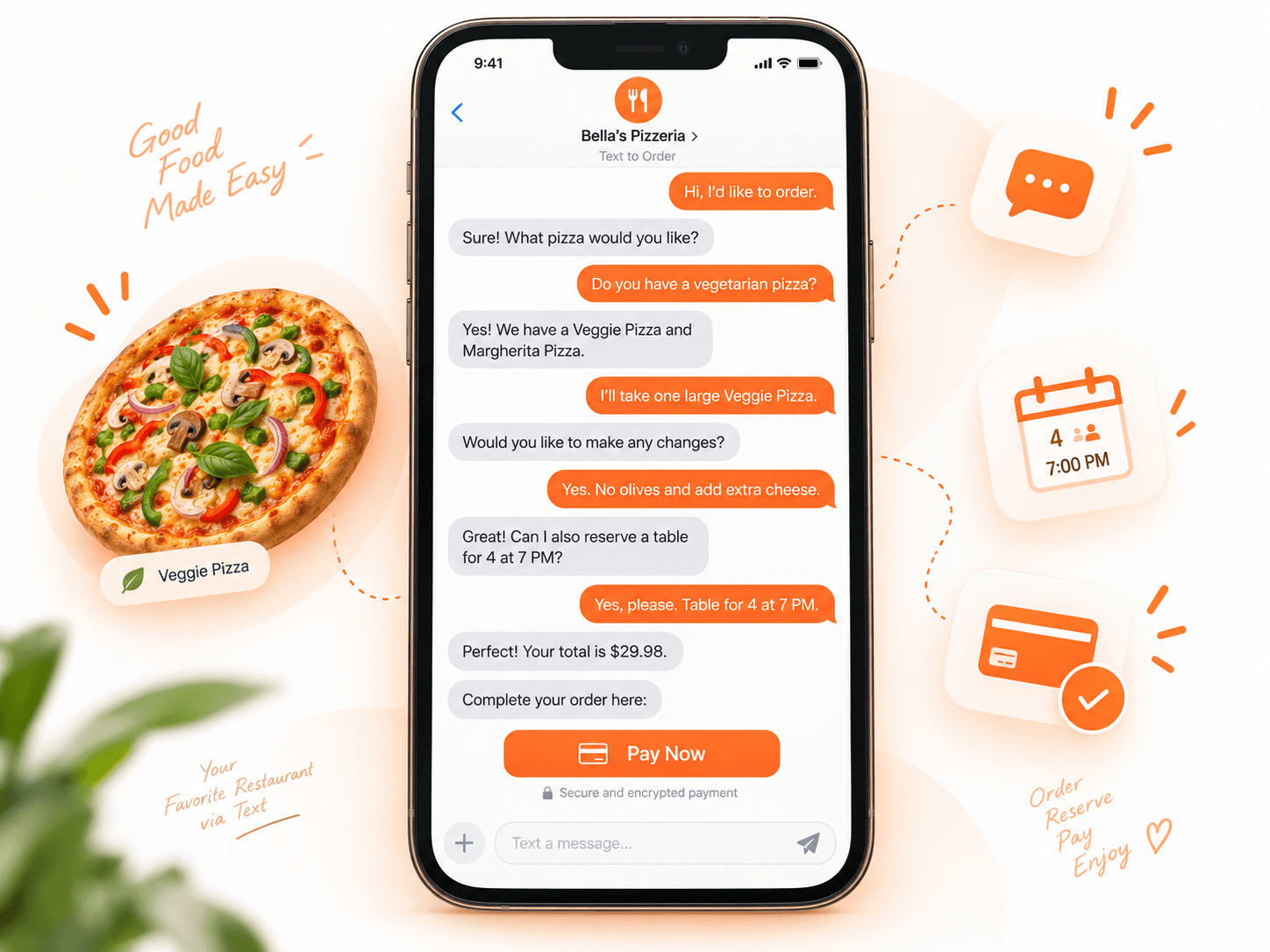
For restaurants, this creates another way to capture customer demand alongside phone, web, QR, delivery, and in-person ordering.
How does SMS ordering work?
A restaurant SMS ordering system should guide the customer through a clear sequence without requiring them to understand how the technology works.
1. The customer starts a conversation
The customer sends a text to the restaurant's SMS-enabled number.
The message may contain:
An order request
A menu question
A pickup request
A reservation request
A question about available options
2. The system understands the request
With AI-assisted SMS ordering, the system interprets natural language and uses the restaurant's configured menu information to continue the conversation.
This is different from systems that depend only on fixed keywords such as ORDER or MENU.
3. The customer selects items
The conversation can guide the customer through available menu items, quantities, sizes, and related choices.
4. Modifiers and add-ons are handled
Restaurant orders often include customizations.
An SMS ordering system can support configured options such as:
Sizes
Toppings
Sides
Add-ons
Preparation preferences
This helps create a more complete order before it reaches the restaurant.
5. Recommendations can be offered
AI-assisted ordering can also support relevant recommendations and upsells based on the customer's current order and configured menu.
6. Payment is handled
Depending on the restaurant's setup, the customer can receive a secure payment link through SMS.
The customer does not need to browse the restaurant website to build the order, although the payment link may open a secure payment page.
7. The customer receives confirmation
Once the ordering process is complete, the customer receives confirmation so they know the order has been captured.
What can customers do with restaurant SMS ordering?
Modern conversational SMS ordering can support more than basic order entry.
Depending on the platform and restaurant configuration, customers may be able to:
Place food orders
Ask menu questions
Choose modifiers and add-ons
Receive item recommendations
Request reservations
Receive secure payment links
Receive order confirmations
Continue the conversation when additional information is needed
The main advantage is that these actions can happen through a familiar customer channel rather than requiring several separate digital experiences.
What are the benefits of SMS ordering for restaurants?
SMS ordering can benefit both the customer experience and restaurant operations.
Less friction for customers
Customers do not need to learn a new interface before ordering.
With conversational SMS ordering:
No app download. No restaurant website visit to build the order. No phone call required.
The customer can begin with a simple text.
Another direct ordering channel
Restaurants can add SMS alongside existing phone, web, QR, and in-person ordering.
This gives customers another way to interact with the restaurant based on their preference.
Fewer routine phone interactions
Customers who only need to place an order, ask a menu question, or confirm basic information may be able to complete those interactions through text.
That can reduce some of the routine demand placed on restaurant staff during busy periods.
For restaurants also looking to improve their phone channel, see AI phone answering for restaurants.
Better support for order customization
Restaurant ordering often requires back-and-forth communication.
SMS can support a conversational process for modifiers, additions, and menu questions instead of relying only on a static order form.
Written order details
Text creates a written record of the interaction.
Customers can review what they requested, and the restaurant can work from clearer order information.
Opportunities for relevant upselling
Recommendations can be introduced naturally during the ordering process.
For example, an SMS ordering system can offer configured add-ons or complementary menu items without requiring staff to suggest them manually every time.
Familiar mobile experience
SMS is already built into customers' phones.
There is no additional restaurant-specific app that customers need to install before they can begin.
Basic SMS ordering vs conversational AI SMS ordering
Not every SMS ordering system provides the same experience.
Basic SMS ordering | Conversational AI SMS ordering |
Often uses keywords | Understands natural-language requests |
May send an ordering link | Can support more of the order within text |
Limited menu interaction | Can answer configured menu questions |
Basic responses | Can guide customers through choices |
May require manual staff handling | Can automate supported ordering steps |
Limited customization | Can support modifiers and add-ons |
SMS acts mainly as a gateway | SMS becomes part of the ordering experience |
This distinction is important when restaurant operators compare SMS ordering platforms.
A system that sends a customer a link after they text ORDER is different from a system that can continue a restaurant-specific ordering conversation.
SMS ordering is different from SMS marketing
Restaurant SMS marketing and SMS ordering use the same communication channel, but they serve different purposes.
SMS marketing | SMS ordering |
Restaurant sends promotional messages | Customer interacts with the restaurant to place or manage an order |
Focuses on campaigns and offers | Focuses on ordering and service |
Mainly outbound | Two-way and conversational |
Encourages future action | Supports an immediate customer action |
Often links to another destination | Can support much of the ordering process through text |
Restaurants may use both, but operators should understand the difference when evaluating technology.
SMS ordering is primarily an ordering workflow, not simply a marketing campaign.
What should restaurants look for in an SMS ordering system?
Restaurants should evaluate whether the platform understands real restaurant ordering requirements rather than simply whether it can send text messages.
Restaurant menu awareness
The system should work from the restaurant's configured menu information so responses remain relevant to actual items and options.
Modifier support
The platform should support the restaurant's configured:
Sizes
Toppings
Sides
Add-ons
Other item options
Menu question handling
Customers frequently ask questions before ordering.
A restaurant-focused system should be able to respond using available menu information and escalate when necessary.
Recommendations and upsells
Look for the ability to suggest relevant configured items during the ordering conversation.
Payment workflow
Restaurants should understand:
How the payment link is delivered
Where the customer completes payment
How payment status is handled
What confirmation the customer receives
Order workflow
Operators should verify how completed SMS orders move into the restaurant's existing workflow.
Supported POS and payment integrations can vary, so compatibility should be confirmed before implementation.
Human escalation
Not every customer question should be handled automatically.
A strong system should provide a way to involve restaurant staff when the interaction requires human attention.
Confirmation
The customer should receive a clear final confirmation when the order has been successfully captured.
Where SnapMenuAI SMS AI fits
SnapMenuAI SMS AI is built around conversational restaurant ordering through text.
Rather than using SMS only to send customers to another ordering page, SMS AI allows supported restaurant interactions to continue inside the conversation.
Customers can:
Place orders
Ask menu questions
Select modifiers and add-ons
Receive recommendations and upsells
Request reservations
Receive secure payment links
Receive confirmations
Continue multilingual conversations where configured
Escalate to restaurant staff when necessary
The customer experience is intentionally simple:
No app download. No restaurant website visit to build the order. No phone call required. Just text the restaurant.
SMS AI is designed to complement a restaurant's existing ordering, POS, and payment workflows rather than requiring the restaurant to replace its entire technology stack.
You can learn more on the SnapMenuAI SMS AI product page.
Where SMS ordering fits in a restaurant's ordering strategy
SMS works best as another customer-access channel rather than as a replacement for every other way people order.
A restaurant may offer:
Phone ordering for customers who prefer speaking
SMS ordering for customers who prefer texting
Direct online ordering for customers who prefer browsing
QR ordering for on-site or table experiences
In-person ordering for dine-in customers
Different channels serve different customer preferences.
For restaurants building their direct website and QR ordering experience, see online ordering for restaurants.
For a broader look at AI across restaurant operations, read AI for restaurants in 2026.
Which restaurants may benefit from SMS ordering?
SMS ordering may be especially useful for restaurants that:
Receive regular pickup or takeout orders
Handle frequent menu questions
Offer menu items with modifiers or add-ons
Want another direct ordering channel
Have customers who prefer texting over calling
Want to reduce routine phone interruptions
Want customers to order without downloading an app
Serve repeat customers who value convenient ordering
The key question is straightforward:
Would allowing customers to order through a simple text conversation make it easier for them to buy from the restaurant?
If the answer is yes, SMS ordering is worth considering.
SMS ordering is becoming more than a messaging feature
Earlier restaurant SMS workflows often focused on keywords, ordering links, notifications, or manual text conversations.
AI-assisted SMS ordering expands that role.
The text conversation itself can now support:
Menu question → Selection → Customization → Order → Payment → Confirmation
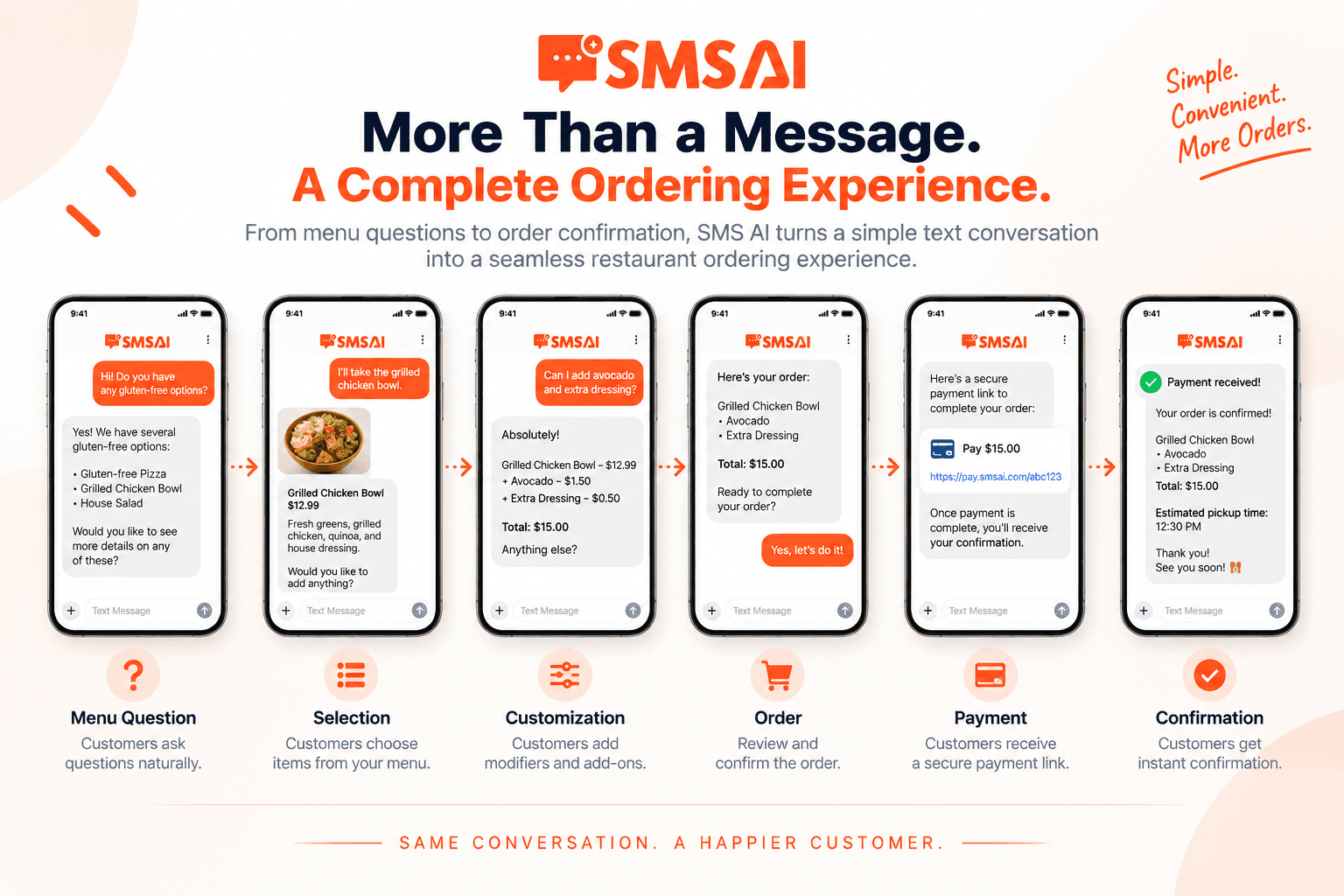
That makes SMS a practical part of restaurant ordering rather than simply a communication layer around another system.
For restaurant operators, the value comes from reducing friction while giving customers another convenient way to order.
Let customers order with a simple text
SnapMenuAI SMS AI helps restaurants support conversational ordering through SMS, including menu questions, orders, modifiers, recommendations, reservations, payment links, and confirmations.
No app download. No website browsing. No phone call. Just text.
Explore SnapMenuAI SMS AI or book a demo.
Frequently asked questions
What is SMS ordering for restaurants?
SMS ordering allows restaurant customers to use text messages to ask menu questions, choose items, customize orders, receive payment links, and receive order confirmations.
How does SMS ordering work?
The customer sends a text to the restaurant. An SMS ordering system interprets the request, guides the customer through menu choices and modifiers, captures the order, provides a payment workflow where supported, and sends confirmation.
Does SMS ordering require an app?
No. Customers can use the native messaging application already available on their phone.
Does SMS ordering require a restaurant website?
Conversational SMS ordering does not require customers to browse a restaurant website to build the order. A secure payment link may still open a payment page when payment is required.
Can SMS ordering handle modifiers and add-ons?
Restaurant-focused SMS ordering systems can support configured modifiers and add-ons such as sizes, toppings, sides, and other available item choices.
Is SMS ordering the same as SMS marketing?
No. SMS marketing primarily sends promotional communication. SMS ordering allows customers to interact with the restaurant to build and complete an order.
Can restaurants use SMS ordering with other ordering channels?
Yes. SMS can complement phone, website, QR, delivery, and in-person ordering rather than replacing them.